HollowTone: Igor Vasiliev's Sample-Free Ambient Worlds for iPad, iPhone and Mac

Most ambient apps hand you a synth and leave the patience to you. HollowTone, the new app from Igor Vasiliev, works the other way round: you set up a small ecosystem of sound and then nudge it while it runs. Vasiliev calls it "a procedural audio instrument" rather than a synthesizer or an ambient player. Nothing in it is sample playback. Every texture is generated in real time.
HollowTone landed on the App Store this week for iPhone, iPad, and Apple silicon Macs. It runs standalone, as an Audio Unit (AUv3), and as an Inter-App Audio module, with Audiobus and Ableton Link support. If you know Vasiliev's earlier ambient generators ExoSphere and NoiseSpace, this is the same idea taken further. Back in April, he described the project on his blog as an environment that "doesn't imitate life, but reminds the body of it."
Five layers, five behaviours
HollowTone is built from five layers. Each has its own engine and its own job, and you can mute any of them with the M button in its header. That is also the quickest way to learn what each one does.
- MistRoot is the foundation: a slowly shifting cloud of noise (Vasiliev calls it "Breath of Space") plus small rustling, friction-like textures that suggest fabric, paper, or leaves without ever sounding literal. Its controls include Color, Motion, Density, Texture, Depth, Grind, Drift, and Space.
- HollowPulse is the low end. It produces slow, rounded pressure waves with harmonic tones blooming inside each pulse. Vasiliev is careful to say it is "not a bassline, not a rhythm, not a drone."
- FlowMorph handles motion. It's a twenty-band vocoder driven by modified noise, and it can move between impressions of droplets, rain, streams, and downpours. Grain, Flow, Mass, Tail, and Grind shape it.
- VeilBreath is a voice that never speaks. Formant resonances drift between five abstract voices, wrapped in breath noise and harmonic shimmer.
- GrainSteps is the odd one out, and the most interesting. It is a Bytebeat engine, which generates sound from raw mathematical expressions. Each pulse launches a new pattern with randomised starting values, and up to six run at once. The manual compares the results to early game consoles and pocket electronic toys. Turn the layer's Space control up and the glitches melt into a reverb haze.
 The layer editor, here showing GrainSteps. Every parameter has its own modulator underneath. Image: Igor Vasiliev / App Store
GrainSteps can sample your own audio
GrainSteps has one feature that matters a lot if you work in AUM, Loopy Pro, or a DAW. Turn on Use Input and the layer stops generating Bytebeat patterns. Instead, it records incoming audio into a one-minute ring buffer, then grabs random fragments from that buffer as source material for each pulse. Tone becomes playback speed. A gate option records only when signal is present, so a vocal phrase, a guitar note, or a drum hit can fill the buffer without silence in between. There is also automatic gain control and an input EQ for shaping the source before it is captured.
According to the manual, the source can be an instrument plugged into an audio interface or another app routed into HollowTone when it runs as an Audio Unit. Everything else in the layer works as usual, including Pulse, Density, Length, stereo Motion, Shape, and Space. HollowTone stops being only a generator and becomes something that can scatter fragments of the rest of your session into the background. If you like that idea, ijo audio's Celestine approaches it from the effects side.
Nine faders on the front
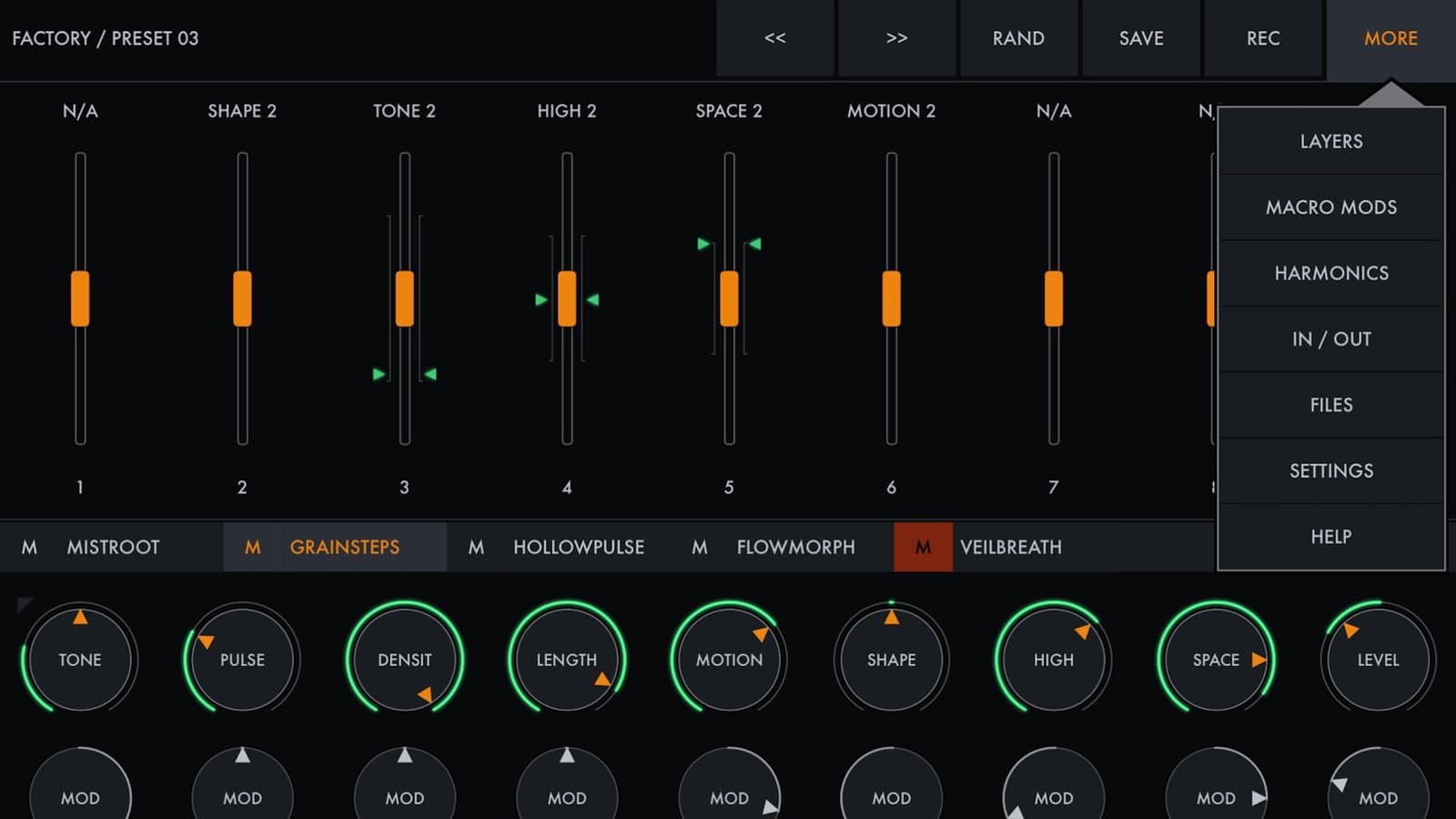
The main screen is almost bare: nine vertical faders and a top bar with preset navigation, Rand, Save, Rec, and More. Those faders are macros. Almost any layer parameter can be assigned to any of them (Drift is the exception), and one macro can drive several parameters across several layers. To assign one, tap the button under a parameter that normally picks its modulation waveform. In macro mode, the Mod knob sets how far the macro can push that parameter.
 The main screen: nine macro faders, each mapped to parameters inside the layers. Image: Igor Vasiliev / App Store
The manual is clear that macros aren't meant for big changes. In its words, they "tilt the entire landscape by a few degrees." That makes them well suited to long-form playing: map a few macros to a MIDI controller and you can shift the mood of a 20-minute piece without opening an editor. MIDI Learn, manual CC or RPN assignment, scaling, pick-up and direct modes, and Bluetooth MIDI pairing are all in the settings.
Slow modulation and harmonic ratios
Every parameter in every layer has its own modulator: a Mod amount, a Rate, and eight waveforms ranging from sine and exponential sine to saws and three square-wave duty cycles. The rate range shows what the app is for. One cycle takes anywhere from 100 seconds down to 10 seconds. Nothing here wobbles at audio rate. All the modulators are synchronised, so parameters set to the same Rate move together. A separate Macro Modulation page lets the macro faders drift on their own as well.
 Harmonic Ratios sets the intervals HollowPulse and VeilBreath can choose from, with presets such as Major, Minor, Dark, Glass, and Subterrain. Image: Igor Vasiliev / App Store
The tonal layers, HollowPulse and VeilBreath, take their pitch from the Harmonic Ratios panel. You set up to eight multipliers between 1.00 and 2.00 relative to the base tone, add fine offsets for microtonal beating, and switch each one on or off. Every new pulse picks the base tone or one of the active ratios, and avoids repeats within a series where it can. A Detune control applies a pitch offset in cents to the base tone at the start of each pulse for analog-style drift, and Tone can be set in musical notes or raw Hz. Presets give you quick starting sets, and you can copy and paste whole ratio sets between patches.
Randomise, then tidy up
The Rand menu can randomise everything, only the macros (it assigns layer parameters to the faders and adds random modulation), or a single layer. The manual's advice is practical: after randomising, go through each layer's Level, Tone, and Color to rebalance the mix. To build a sound from scratch, load the INIT preset and work up one layer at a time.
 The Rand menu can randomise everything, just the macros, or a single layer. Image: Igor Vasiliev / App Store
The rest is housekeeping. There's a preset manager with groups and favourites, and presets export as .hollowtone files. A master section has bass and treble shelves and a parametric EQ. In standalone mode, a Rec button captures the full output to an audio file. The full parameter guide is built into the app and is also available as a PDF. It's unusually readable, and every control comes with a "Think of:" image to explain it.
Who it's for
HollowTone isn't a pad synth you play from a keyboard. It's built for sound that sits behind other things, like meditation and relaxation audio, game and video backgrounds, or the uneasy, liminal side of ambient. Vasiliev's own list goes from dreamlike spaces to "backrooms, sci-fi, dark fantasy, thriller tension, and quiet horror." If that second half is what you're after, it pairs naturally with Sfoor Labs' SL DREAD, which builds horror atmospheres out of your own audio.
Synth Anatomy notes that the release slipped by several weeks because App Store review is currently backed up. The site also found it less overwhelming at first than some of Vasiliev's earlier apps, which matches the design: a calm front panel with the depth one menu away.
Price and compatibility
HollowTone is listed at US$9.99 on the App Store. It needs iOS or iPadOS 16 or later, and Macs with M1 or later. On iPhone and iPad it runs standalone, as an AUv3, or via Inter-App Audio. On the Mac it runs standalone or as an AUv3 in hosts such as Logic Pro, GarageBand, MainStage, Ableton Live, and Reaper. More demos and walkthroughs are linked from the developer's HollowTone page.