STPZMX Packs 15 Synth Engines Behind Two Knobs, on iPad and Mac as AUv3

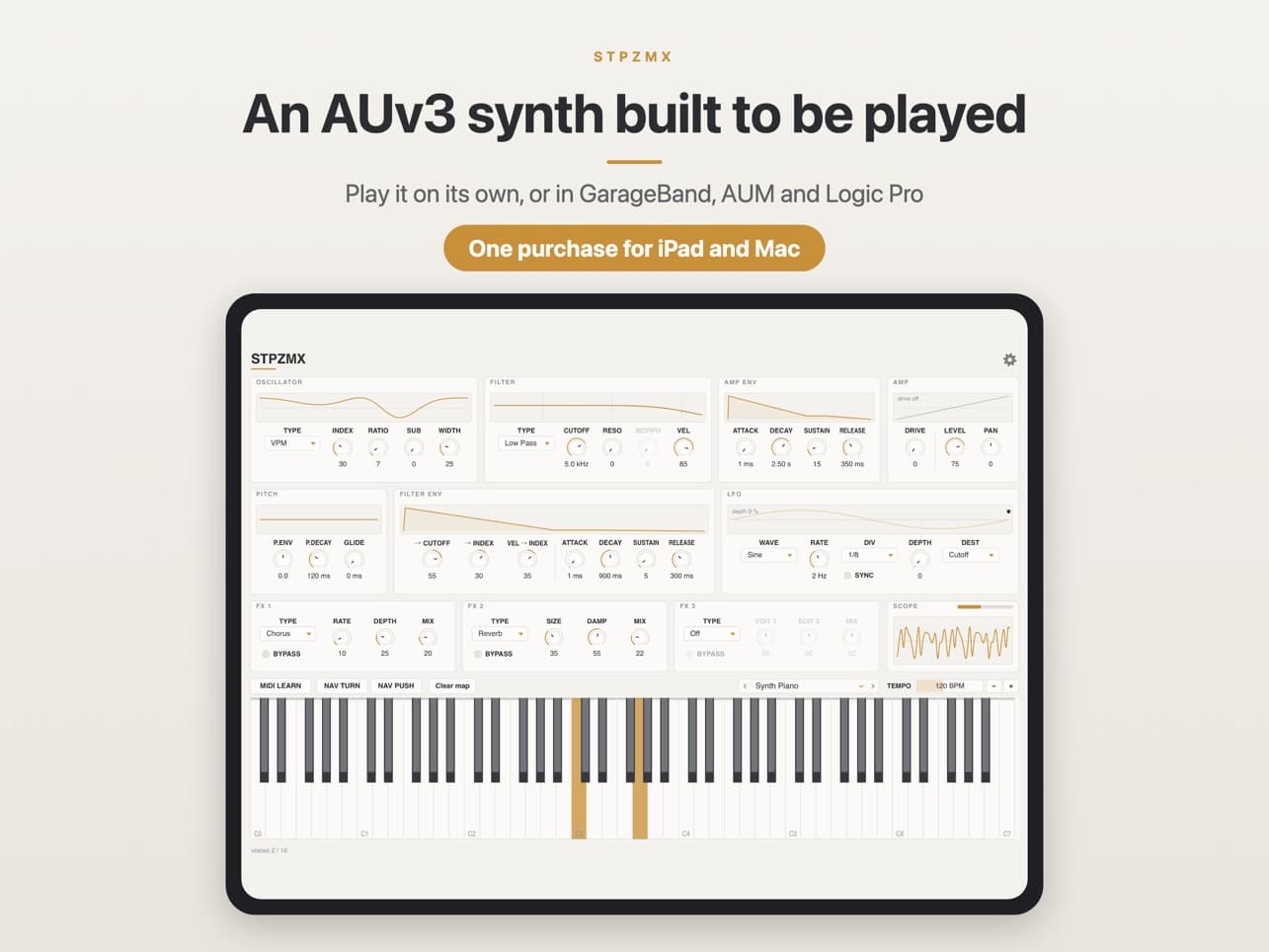
Plenty of synths offer more than one engine. Few go as far to keep those engines out of your way. STPZMX, from Theeraphat Sritharathikhun's Thailand-based studio STPZ LAB, has fifteen synthesis models, from plain analog to formant, comb and feedback FM, and every one of them is played through the same small set of controls. Pick a model, turn two EDIT knobs, and the sound changes character without a new page of parameters.
It came out on the Mac on 27 October and cleared review for iPad around 2 November. It runs standalone and as an AUv3 plugin, and one purchase covers both platforms. The current App Store listing is $5.99; the developer says on KVR that the launch price lasts until 16 November, then rises to $9.99. We haven't played it ourselves yet, so this is a first look based on STPZ LAB's product page, the App Store listing and the developer's own posts.
 Fifteen models, one panel. Image: STPZ LAB / App Store
One synth for the stage
The idea is explained in the developer's announcement on the KVR forum. Sritharathikhun wanted one synth he could take on stage that covered a wide range of sounds, without having to dig through menus to get from one to the next. The result is a fixed layout. The model changes, but the knobs stay where they are, so your hands already know where to go.
He's also open about which models he thinks stand out. In the same post he calls Comb and Metal the odd ones, while VPM and FM FB are the sharp, cutting ones. That's a handy hint for where to start if you're after something less familiar than a saw wave through a low-pass filter.
Fifteen models, two knobs
The fifteen models are Analog, Dual, Ring/Cross, Noise, Sync, Unison, Chord, Comb, VPM, Additive, Formant, Perc, Metal, Wavefold and FM FB. Each one puts model-specific parameters on the same two EDIT knobs. Every model also has a sub oscillator to add weight underneath.
 From Analog and Sync to VPM, Formant and FM FB. Image: STPZ LAB / App Store
Filter, envelopes and modulation
After the oscillator comes a multimode filter with low-pass, high-pass, band-pass, notch and Morph modes. It has its own envelope and responds to velocity. Separate amp and pitch envelopes, glide, stereo width and a drive stage round out the voice.
The LFO offers sine, triangle, saw, square and sample-and-hold shapes, running freely or synced to the host tempo. It can modulate pitch, cutoff, amplitude, or the EDIT knobs themselves. That last one lets you animate whatever the current model treats as its main parameter. STPZMX plays up to 16 voices.
 The SCOPE view shows what the EDIT knobs are doing to the waveform. Image: STPZ LAB / App Store
A built-in SCOPE shows the output waveform. With models this different from each other, that's a useful way to see what a knob is actually doing, especially when you're learning how Wavefold or VPM respond.
Effects and presets
There are three effect slots, filled from a list of seven: Delay, Repeat, Distortion, Decimator, Chorus, Reverb and Phaser. Repeat provides tempo-synced stutter; that and Decimator suggest the effects are aimed at live performance as much as at polish, which suits the stage brief.
 71 factory presets in eight groups. Image: STPZ LAB / App Store
STPZMX ships with 71 factory presets in eight groups: Bass, Lead, Keys, Pluck & Mallet, Pad & Strings, Chord & Stab, Drums, and FX & Texture, plus an Init patch. Your own patches can sync between iPad and Mac through iCloud Drive, so a sound you build at the desk is waiting on the iPad when you get to the gig.
 Presets travel between iPad and Mac via iCloud Drive. Image: STPZ LAB / App Store
Hearing it
STPZ LAB has posted a short clip of STPZMX playing a ranat-style sound, a nod to the Thai xylophone, which shows off the percussive side of the engine:
A second video pairs it with STPZ LAB's STPZAMB inside AUM, which gives a better idea of how it behaves as a plugin in an iPad setup:
Built for playing live
The details point toward performance. MIDI Learn lets you put the EDIT knobs, cutoff and other controls on a hardware controller, and Bluetooth MIDI means a wireless keyboard works without a dongle on the iPad. There are two visual themes, a light Paper theme and a dark Night theme. Night is the one you'll want on a dim stage.
 The Night theme for dark stages and late sessions. Image: STPZ LAB / App Store
STPZ LAB also keeps things simple elsewhere. There's no account, no ads and no data collection. The download is about 9.9 MB.
Requirements and who it's for
STPZMX needs iPadOS 15 or later, or macOS 12 or later. It's iPad-only on iOS, so there's no iPhone version. It runs standalone and as an AUv3 in hosts such as GarageBand, AUM and Logic Pro. There's no VST or AU v2 version, so on the Mac you'll need an AUv3-capable host. One purchase unlocks both the iPad and Mac versions.
On paper it should suit players who want a wide range of sounds from one plugin without learning fifteen interfaces, live performers who need fast changes and controller mapping, and anyone curious about VPM, comb or feedback FM synthesis without committing to a deep, specialist synth. If you'd rather go deep into one method, our look at 4Pockets SpectraPad covers a very different approach. More details are on the STPZMX product page and STPZ LAB's site, and the app is on the App Store with a current listed price of $5.99.