Materia: AudioThing's Additive Re-Synthesizer Turns Any Sample Into Up to 96 Editable Partials on iPad and iPhone

AudioThing's Materia takes a recording apart. Load a sample and Materia analyses it into a set of sine partials, each with its own frequency, amplitude, phase and envelope. From that point you're no longer playing the recording. You're playing a model of it, and every part of that model can be edited.
That opens two routes. You can keep the character of the source and play it polyphonically across the keyboard, or you can reshape the spectrum, redraw how individual harmonics evolve and run the result through a resonator that models physical materials until it sounds nothing like where it started. Materia runs as an AUv3 instrument and a standalone app on iPhone and iPad, and the same instrument is available on desktop.
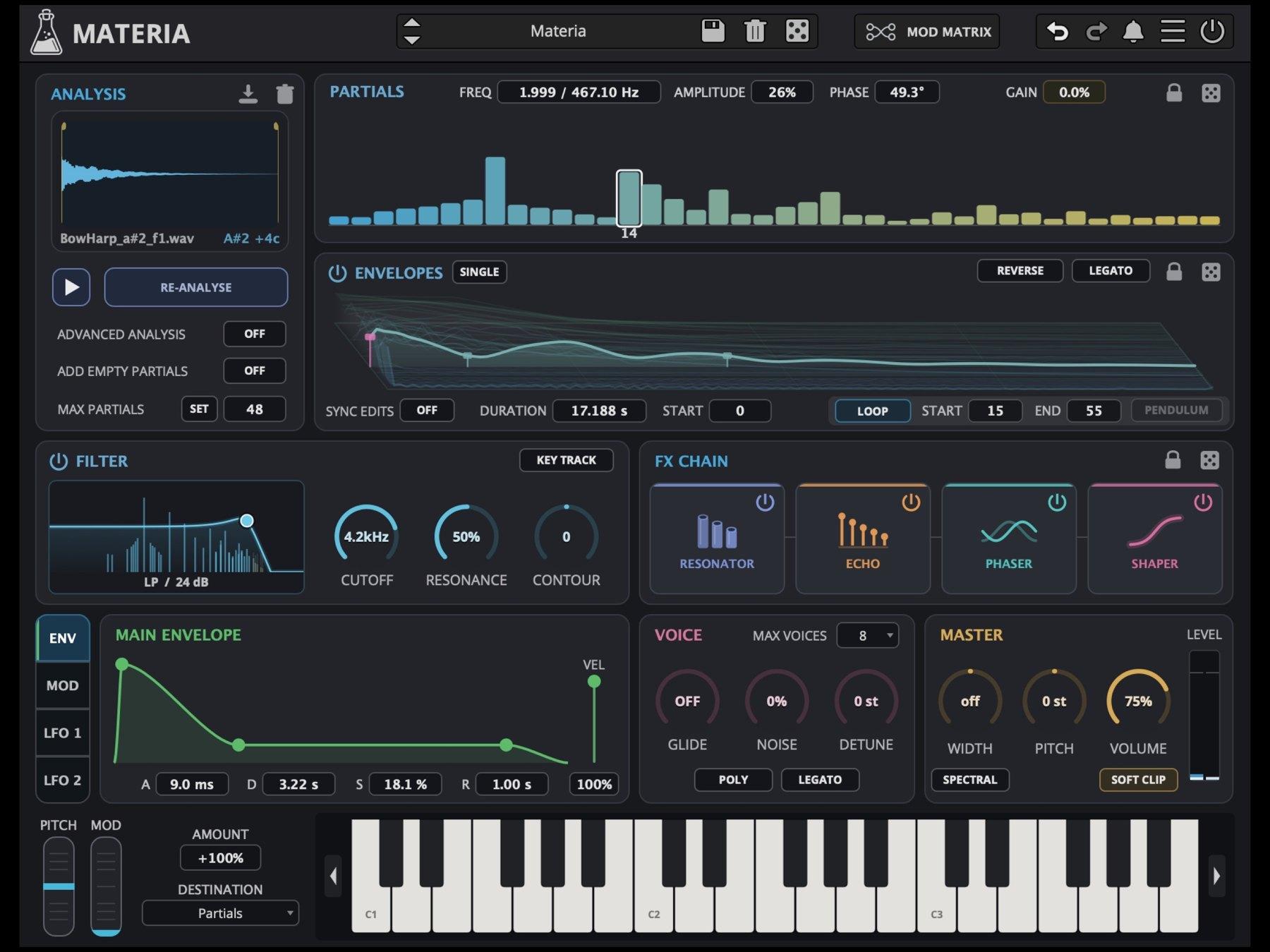
 Materia's full interface on iPad, with a BowHarp sample loaded and Max Partials set to 48. Image: AudioThing
From sample to spectrum
Analysis
Everything starts in the Analysis section, where the source sample lands on the waveform display. Max Partials sets the maximum number of partials the analysis generates, from 1 to 96. The Set button applies a new count to the current sound without re-analysing it: raise the number to get extra silent partials to work with, lower it to remove the excess.
Two switches change what the analysis produces. Advanced Analysis takes longer but gives every partial its own envelope duration and sustain loop instead of shared timing. Add Empty Partials adds silent slots beyond those detected in the sample, ready for new harmonics drawn by hand. Every partial can be shaped from an empty spectrum, so Materia doubles as a straight additive synth when you want one.
The analysed model is stored with the plug-in state. A project or preset reopens intact without the original sample file, which keeps AUv3 sessions portable.
Partials
The partial display is the heart of the instrument. Each bar is one sine partial. Tap a bar to select it, or drag across the display to reshape the whole spectrum in one gesture. For the selected partial, Freq sets the frequency and shows both its harmonic ratio and the resulting value in Hz, Amplitude sets its level and Phase sets its starting phase in degrees. Gain trims all partials together.
Move a harmonic ratio off a whole number and that partial no longer sits in the harmonic series. Doing it one partial at a time lets you decide exactly which parts of a sound stay pure and which turn metallic or bell-like.
 The Partials display and the per-partial Envelopes editor. Image: AudioThing
An envelope for every partial
Each partial has its own 128-point envelope with editable duration and sustain loop points. The Envelopes display shows all of them at once, with the selected one highlighted and the rest visible behind it for reference. Drag points or segments to redraw a curve, or switch to Single view to focus on one partial.
Duration sets the length of the selected envelope and Start moves its start point. Loop repeats a section while a note is held, with Start and End setting the boundaries, and Pendulum plays that loop forwards and backwards alternately. Reverse plays the envelope from end to start. Sync Edits applies duration, start and loop changes to every partial at once, the quick route when all the harmonics should keep the same timing.
The section has its own Legato switch, separate from the one in the Voice section. With it on, overlapping notes continue from the current partial-envelope position rather than restarting.
Try it: load a sustained source with Advanced Analysis on, so each partial gets its own loop, then turn on Pendulum.
Try it: load a percussive sample, enable Reverse and play slow chords. Every partial swells in from the tail of its decay instead of starting on the attack.
 A 3D view of the individual partial envelopes over time. Image: AudioThing
Filter and FX chain
Filter
After the partials comes a filter with ten types spanning low-pass, high-pass, band-pass, notch and formant modes. Cutoff and Resonance behave as expected. Contour sets how strongly the main amplitude envelope moves the cutoff: positive values open it as the envelope rises, negative values close it. Key Track links the cutoff to the played note so the filter's response stays relative to pitch.
Resonator
The first of four effects is the most distinctive. The Resonator is an algorithmic model of physical materials, with models including pipes, plates, glass, wood, stone, gongs, membranes and springs. Size sets the perceived size and length of the material, which changes both its pitch and resonant character. Density runs from a sparse, focused set of resonant modes to a fuller, more complex one, and Brightness sets the damping, from dark and muted to bright and lively. Transient makes the Resonator respond mainly to the attack of each note for a sharper, more percussive result, and Swirl adds slow, independent movement to the left and right pickup points for a wider, animated stereo image. Mix sets the balance.
Try it: draw a sparse spectrum of a few partials with short envelopes, then send it into a glass or gong model with Transient on. The partials become the exciter and the Resonator supplies the body. Add Swirl for moving stereo tails.
Echo, Phaser and Waveshaper
The Echo is built on a programmable pattern of taps. Time sets the tap timing, Tail sets how strongly the whole pattern feeds back (at zero you hear it once), and Tone darkens or brightens the repeats. Ping Pong alternates echoes between channels, and Pendulum plays the tap pattern forwards and backwards on successive repeats.
The Phaser is multi-stage, with Stages setting the number of phase-shifting stages alongside Rate, Depth and Feed, which sets both the amount and the polarity of feedback. The Waveshaper offers Drive, Fold for wavefolding, Tone and an Asymmetric switch that shapes the positive and negative halves of the waveform differently. Each effect has its own Mix control.
 The Filter section and the four-slot FX Chain. Image: AudioThing
Modulation, voice and master
Below the sound engine sits an ADSR Envelope for note volume, with velocity control, and a Mod Envelope with its own ADSR for animating a chosen parameter. Two LFOs use preset or fully drawable waveforms, with rate, amount, destination and optional tempo sync. Handles on either side of the waveform set its loop boundaries, so you can draw a long shape and cycle through just part of it.
The Modulation Matrix, opened from the top bar, gathers every assignment in one place. Each source row has an enable switch, a destination and a bipolar amount. The Mod Envelope and LFO rows mirror their panels, while Mod Wheel and Velocity rows add performance control.
The Voice section sets Max Voices, Glide and Detune, which introduces small tuning differences between all the partials, plus a Mono mode. Its Legato switch continues the main and mod envelopes in Mono mode, or starts notes directly at Sustain in Poly mode. Noise blends back in the noisy attack captured from the source sample, falling back to a synthesized noise burst when there's no captured noise data.
The Master section has Width, Pitch in semitones, Volume and Soft Clip for gentle peak saturation. The Spectral switch changes how Width works, distributing individual partials across the left and right channels.
Try it: turn on Spectral, raise Width and add a little Detune. Each partial gets its own place in the stereo field and a slight tuning offset, a strong starting point for pads built from a single sustained note.
 Materia in landscape on iPhone, with the same sections as the iPad layout. Image: AudioThing
The preset browser includes a randomizer, and Parameter Lock holds chosen values in place when you change presets or randomize. Presets can also be copied to and pasted from the clipboard for sharing.
Two routes to additive
4Pockets SpectraPad builds its sounds from 16 harmonic partials rather than from samples, which makes it a design-from-scratch instrument. Materia comes at the same territory from the other direction. Its usual starting point is a recording, with up to 96 partials and per-partial envelopes captured from the source, and drawing into an empty spectrum is the alternative route rather than the main one. For sculpting from real-world material, Materia is the one built for the job.
Price and availability
Materia costs $9.99 on the App Store and runs on iPhone and iPad as an AUv3 instrument and a standalone app. It requires iOS or iPadOS 15 or later, and Family Sharing is supported. Materia is also available for macOS, Windows and Linux in VST2, VST3, AU, AAX and CLAP formats from AudioThing.
It suits sound designers who want playable instruments from field recordings and found objects, ambient and film composers after evolving pads with real-world texture, and anyone who wants to get inside a sample's harmonics rather than just filter them.