Airwindows Consolidated Brings Chris Johnson's 500+ Free Effects to iPad and iPhone as One AUv3

Chris Johnson's library of hand-crafted effects has lived on macOS, Windows, Linux and inside VCV Rack, but never on the iPad. That changed on 31 October, when Airwindows Consolidated AUv3 cleared App Store review and landed as a free download for iPhone and iPad. It packs the whole catalogue, more than 500 effects, into one Audio Unit you can drop into any AUv3 host.
The port is the work of Sveinbjörn Pálsson, who built it on top of Paul Walker's desktop Consolidated registry, with Chris's blessing to use the Airwindows name. There are no ads, no tracking and no accounts. In his announcement on the Loopy Pro forum, Sveinbjörn wrote, "Airwindows Consolidated is finally through App Store after a whole month!"
Chris's introduction below explains the desktop version. It covers Consolidated for Mac, Windows and Linux rather than the iOS app, but the iOS version follows the same idea: the Airwindows library in one plugin, with categories and curated collections to help you find an effect.
What Airwindows is, and why "trust your ears" matters
Chris Johnson releases one new effect a week, funded by his Patreon, with desktop versions downloadable free from airwindows.com. Each plugin comes with an intro video, and many are incremental upgrades on earlier designs. Rather than retiring the old versions, Chris keeps them around for compatibility and for people who love a particular one, which is a large part of why the library has grown so big.
The other defining trait is that Airwindows plugins have no interface of their own. On the desktop they appear however your DAW dresses a plugin by default, with the host supplying the controls. The App Store listing explains the approach: "Therefore you are forced to trust your ears. This version tries to stay faithful to that."
When Paul Walker of the Surge XT project gathered the library into a single desktop plugin in 2024, Chris welcomed it with the line "Welcome to the Airwindows plugin for everybody else". That version also brought in the whole Airwindopedia, Chris's explanation of every plugin, which he describes as "close to a hundred and fifty thousand words". The iOS port displays Chris's effect descriptions beneath the controls.
How the iOS wrapper works
iOS hosts don't offer a generic plugin view the way desktop DAWs do, so Sveinbjörn had to supply one. His answer emulates "a generic apple layout", and the GitHub README describes the interface as "obsessively designed to appear barely designed". Each instance hosts one effect at a time, chosen from a browser-style picker. The README adds: "The audio path is Chris's DSP, untouched."
 The effect browser, with Recommended, Basic and Latest filters above the category list. Image: Sveinbjörn Pálsson / App Store
The browser sidebar has search plus Recommended, Basic and Latest buttons, followed by categories with counts. The screenshots show Ambience (25), Amp Sims (17), Consoles (56), Dithers (23), Dynamics (34), Filter (55), Lo-Fi (20), Reverb (40) and more, with 516 effects under All and 30 marked New. Effects can be starred as favourites and pinned.
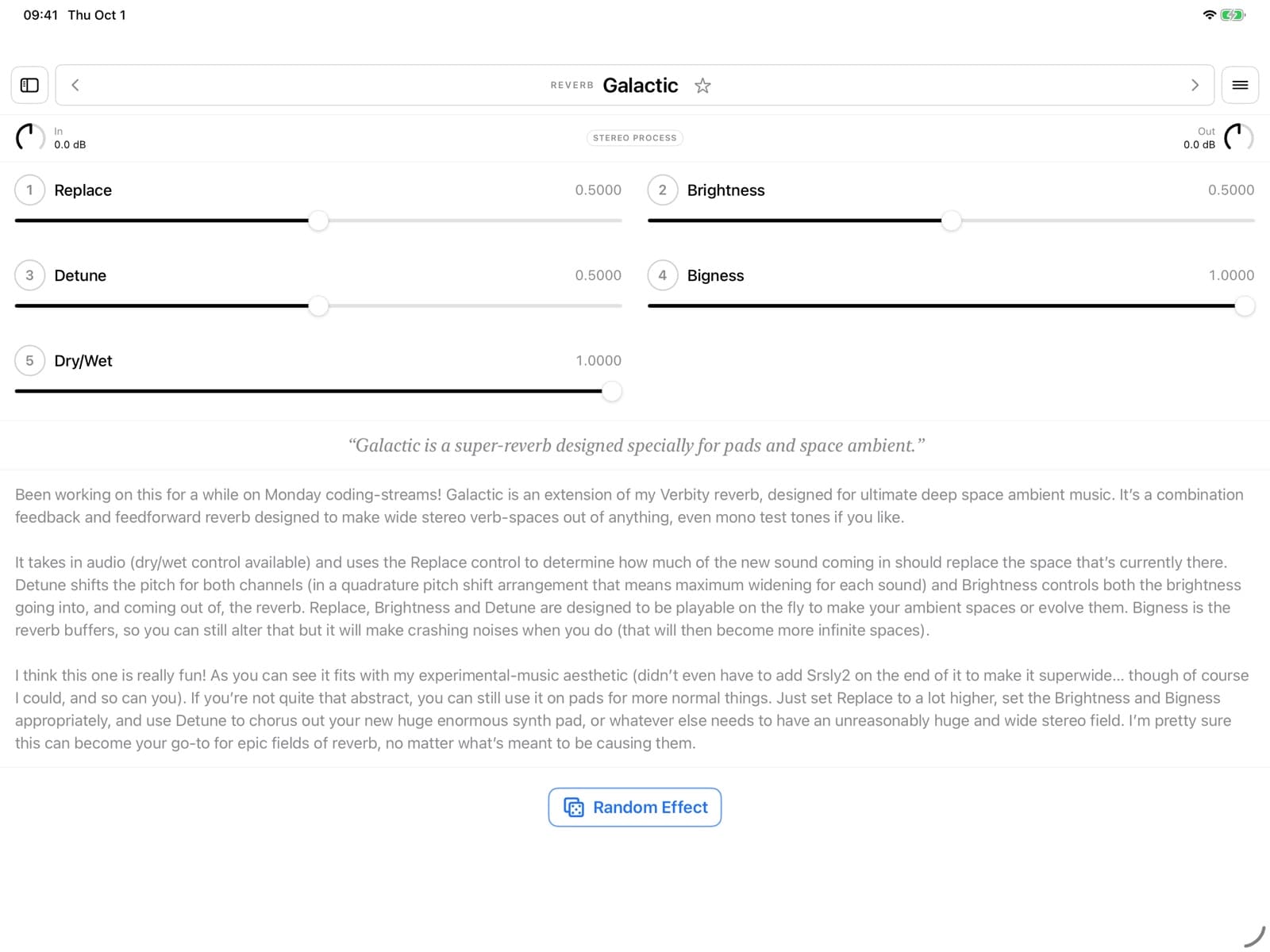
Once an effect is loaded, its parameters appear as either sliders or rotary pots, your choice, with in and out gain alongside. Chris's description sits right under the controls, and there are links to his blog post and YouTube video for each effect. Day and night modes are included, and a Random Effect button loads something at random. Many of these touches come from Paul Walker's original desktop Consolidated. A standalone container app also lets you audition effects through the microphone.
 The category list in night mode. Image: Sveinbjörn Pálsson / App Store
Where to start with 500+ effects
With more than 500 effects to browse, Recommended and Basic offer a starting point. On the desktop, Chris described Recommended as "basically Airwindows' Greatest Hits", while Basic gathers easily understood plugins for people starting out with mixing. As an example of how the versions relate, he notes that Galactic2 is more specialised than the original Galactic, which is the one in Recommended.
 "Galactic is a super-reverb designed specially for pads and space ambient." Chris's description appears under the controls. Image: Sveinbjörn Pálsson / App Store
That focus on pads and space ambient makes Galactic a relevant starting point for readers of our HollowTone ambient AUv3 piece. For another approach to processing sound, our Celestine coverage looks at granular effects.
Asked on the forum how to approach the library, Sveinbjörn pointed to Chris's own favourites in Recommended and Basic, then offered a less structured method: "my biggest fave is just chucking something on there and seeing how it goes. That's really how you find things." His other tip: "really try everything reverb / echo. And i find DubCenter to be a lot of fun, it sort of gets you into the weird and different things Chris' effects do."
Forum users chipped in with their own picks:
- Samu, a Mackie 1202 owner, named Mackity (under Distortion) and MackEQ (under Filter) as favourites.
- wim recommended the SoftClocks series for shaking loose grooves, adding "they're weird".
- Squishy listed tape and colour tools: TapeHack2, ToTape8 (there is now a ToTape9), LilAmp, PowerSag2, TapeBias, Galactic3 and Woodenbox.
Weekly updates, starting now
Because Chris releases a new effect every week, a static app would fall behind quickly. Sveinbjörn's next step, in his words, is "starting the weekly updates machine, see how Apple receives that." His automatic update system has already done a dry run, and TestFlight testers get the newest effects.
Version 1.0.5 arrived within a day or two of launch. It adds three recent Airwindows releases: VerbSevens, "a calibrated reference reverb for reverb matrices"; Echojam, "an echo effect that is secretly a reverb"; and PunchyDeluxe, "a smoother form of PointyDeluxe". It also brings fresh descriptions for DeRez5, VerbSevens and Echojam, plus upstream fixes and refinements to nine existing effects.
Open source, and how it was built
Like Chris's code, the wrapper is MIT-licensed and on GitHub. The README says it was built with substantial assistance from Claude Code. Sveinbjörn writes, "This plugin only exists because I was tired of waiting for an actual coder to do this." He argues that open-sourcing AI-assisted code is a necessary safeguard and has documented the project so others can follow it.
Compatibility
The app requires iOS or iPadOS 17.0 or later and is a 14.6 MB download. Sveinbjörn has tested it in AUM, Cubasis, Logic Pro for iPad, GarageBand and Loopy Pro, and says sessions and presets "should" restore through AU state saving.
One forum user reported that on iOS 17.7.1 with an iPad Air 3, the effect knobs and sliders wouldn't move, although in and out gain worked. Another user said it runs fine on iOS 18. This remains an unconfirmed compatibility report. For more plugins like this, browse our effects coverage.
Availability
Airwindows Consolidated AUv3 is free for iPhone and iPad. Download it from the App Store.