VU303 Brings 32-Pad Phrase Sampling and AUv3 Hosting to iPad and iPhone

Dariusz Chynek's VU202 was a pocket sampler with a single main screen. VU303 arrived on the App Store on 31 October as a phrase sampler and pattern sequencer for iPhone and iPad, and version 1.0.1 followed a day later with the note "Patch zero bugfixes and improvements." The developer's site lists Mac and Android versions too.
The App Store description calls it a sampler "built like the hardware samplers of the late '90s", where "every key is labelled with what it does, every knob turns, and everything you need to make a beat sits on one panel". VU202, according to the same listing, was downloaded by more than 19,000 people on iOS. VU303 runs standalone, works as an AUv3 instrument plugin, and can host AUv3 effects in its own mixer.
The Loopy Pro forum thread announcing the release, started by forum user eylvy, is titled "VU303 - The Boss SP-303 emulator (Released)". That is the thread's description rather than the developer's. Chynek's manual describes "a panel in the style of a late-'90s phrase sampler", and the site notes that VU303 is not affiliated with the owners of the trademarks it refers to.
The walkthrough below comes from eylvy's YouTube channel, "e y l v y". It is a user's video, not an official one from the developer. The same channel also has a video on LP-33 Sim, another SP-303-style effects plugin for iOS.
Six views, one panel
VU202 had one screen with modes. VU303 replaces that with six views: PADS, STEPS, TRIM, SONG, MIXER and LIVE, selected from keys along the top. The transport (STOP, PLAY, REC and a PATTERN/SONG toggle) stays at the bottom whatever view you're in. Each key carries its function as a label, and settings that need more room open in a dialog over the panel. Layouts are provided for iPhone and iPad in portrait and landscape, with adjustable text sizes and hold-to-magnify for labels.
 The PADS view: 32 pads in four banks, three CTRL knobs and six DSP effect slots. Image: Dariusz Chynek / App Store
PADS is the main panel. There are four banks of eight pads, and each pad can be gate or one-shot, looped, reversed, and set to stereo, mono, left or right. Any bank can be made a choke bank, in which only one pad sounds at a time. The manual suggests this for open and closed hi-hats or chopped breaks. Three CTRL knobs handle volume, pan and pitch for the selected pad, or take over the first three parameters of whichever effect is selected. The six DSP keys show the slots for the selected pad, bank or master bus; holding an effect key opens a picker with 26 effects.
Sampling and the two engines
Sound gets onto a pad in three ways. You can record from the microphone or an audio interface, resample the app's own output with each pad's effects included, or load files through the SOURCE dialog. SOURCE also takes whole folders and the audio track of a video. Nine built-in drumkits supply 785 samples, named after the samplers they were recorded from, from MPC60 to EMAX.
Each pad plays through one of two engines. The new VU303 engine offers STANDARD at 44.1 kHz, LONG at 22.05 kHz and LO-FI at 11.025 kHz. The VU202 engine keeps its HI-FI, STANDARD and two LO-FI settings, down to 3.9 kHz. The manual says the lower qualities band-limit the sample "for a darker, grittier sound". Holding the quality key on PADS opens the engine selector for that pad.
Trim, chop and stretch
 TRIM handles start and end points, loops, chopping and time-stretching. Image: Dariusz Chynek / App Store
TRIM is the sample editor. It covers start, end, level, attack and decay, zoom up to ×64, and zero-crossing snap to avoid clicks. Truncate, normalise, reverse, silence and remove all share a single level of undo. Loop mode adds loop start, loop end, a loop release point and a crossfade at the seam. CHOP TO BANK slices a sample into 4 or 8 one-shot pads across a bank, or 16 across a pair of banks, while STRETCH fits a loop to the project tempo, either keeping its pitch or behaving like varispeed tape. A STEMS key can separate a sample using LALAL.AI, but it needs your own LALAL.AI key and uploads the sample to their servers. According to the manual, this is the app's only online function.
Steps and song
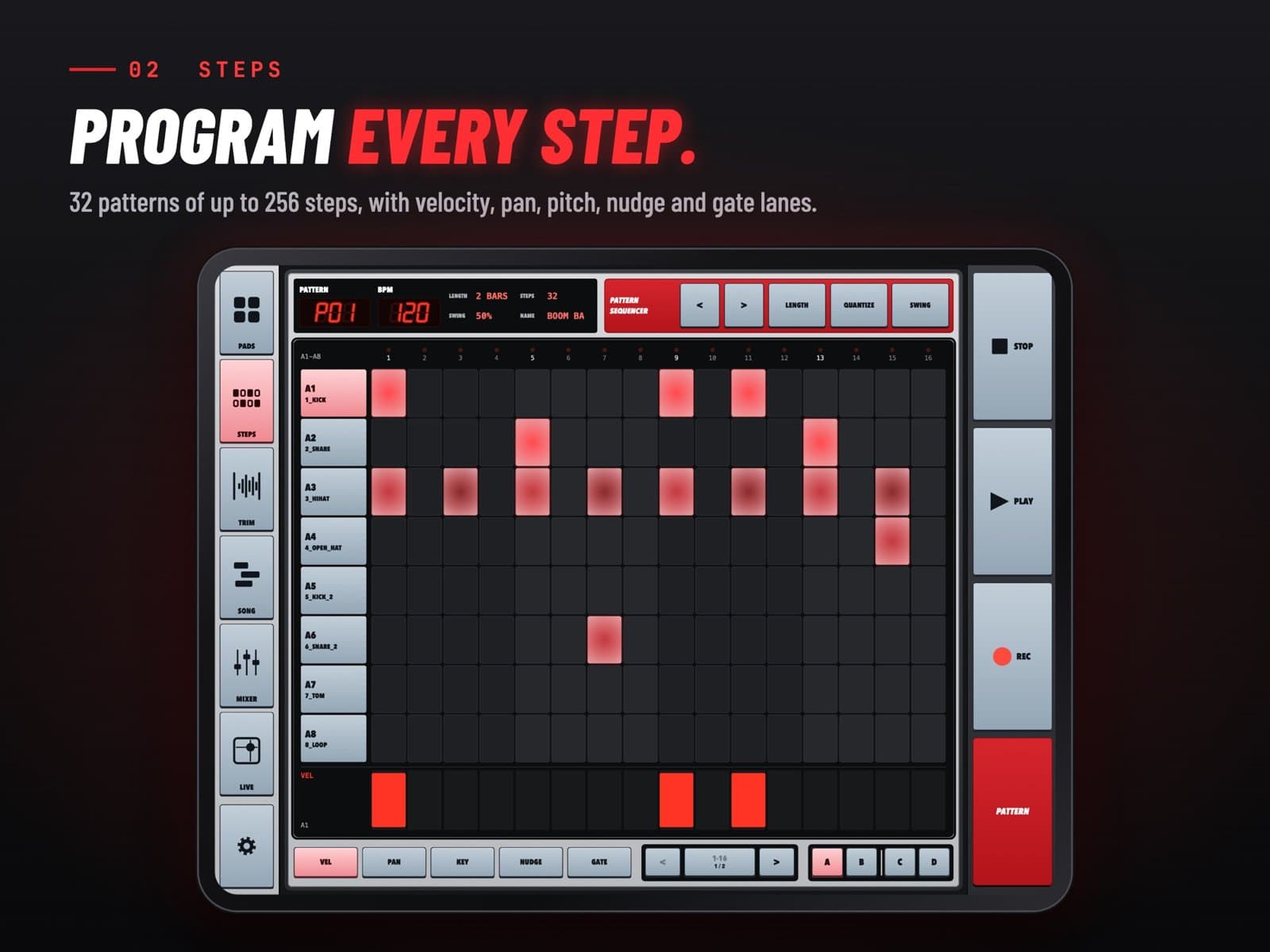
STEPS shows the current pattern as a grid, one row per pad of the selected bank and 16 steps per page. There are 32 patterns, each up to 256 steps (16 bars), and every hit has VEL, PAN, KEY, NUDGE and GATE lanes. Live recording snaps to a 1/4, 1/8 or 1/16 grid, with an optional one- or two-bar count-in. Swing runs from 50 to 75 per cent, which the manual describes as "MPC3000-style timing", and it is stored per pattern. A DOUBLE function copies a pattern into a new second half as a starting point for variations. SONG chains up to 32 pattern steps, each repeated between one and 16 times. For related reading, see our BloopMachine and TDminator 2 piece.
Mixer, inserts and AUv3
 The MIXER, with insert slots that take built-in effects or AUv3 plug-ins. Image: Dariusz Chynek / App Store
The MIXER has strips for banks A–D and the master, plus a pad view, with faders and meters. Pad and bank strips have mute and solo; the master has mute only. Each strip has up to five insert rows. Each bank and the master can hold two AUv3 plug-ins, but individual pads cannot. For related effects coverage, see our Airwindows Consolidated AUv3 piece. Plug-ins open in floating windows that can be moved, resized and pinned. If a project uses a plug-in that's no longer installed, the slot is kept and marked NOT INSTALLED. Exports, rendered as 44.1 kHz, 24-bit WAV mixes or stems, include insert effects and AUv3 plug-ins.
Live effects
 LIVE: eight XY pads on the master output, each with one of 16 performance effects. Image: Dariusz Chynek / App Store
LIVE gives you eight XY pads that process the master output. Touching a pad switches its effect on, and lifting your finger switches it off, unless LATCH is on. The 16 effects include tape stop, beat repeat, grain scatter, vinyl warp, dub delay, freeze, trance gate and pitch dive, and several pads can be played at once. MIDI LEARN can map the X, Y and on/off of each pad to a controller, alongside knobs, faders, keys and TRIM markers in the other views. Mappings are saved as shareable templates. Without any setup, MIDI notes 36–67 play pads A1 to D8.
A first beat
The manual's quick-start runs to eight steps. On PADS, select pad 1, open SOURCE, choose a kick from one of the DRUMKITS, preview it and assign it. Do the same for a snare and a hi-hat on pads 2 and 3. Tap the BPM display to set the tempo, then open STEPS and tap cells to place hits on rows A1 to A3. Press PLAY and keep changing pads, steps and effects as it runs. Back on PADS, select a pad, choose REVERB or DELAY and adjust it with the CTRL knobs. The project autosaves, so the last stop is SETTINGS, where SAVE AS gives it a name and EXPORT renders a WAV.
Bringing VU202 projects across
VU202 users don't have to start again. In SETTINGS, LOAD › OPEN .VU303 / .VU202 FROM FILES… opens an old project, which loads on the VU202 engine so its pads keep their HI-FI, STANDARD or LO-FI character. Any pad can be moved to the VU303 engine afterwards. Saving writes a .vu303 file, which the manual says uses the same project format inside and can be opened in VU Studio on a computer. From an iPhone or iPad, SEND PROJECT sends it over the same Wi-Fi network.
Early impressions from the forum
On the forum, eylvy compared VU303 with Koala, saying it "does a lot Koala does but in a different workflow". They singled out the compressor in the LIVE section and the vinyl sim, which they said "automatically adds grit to the samples" and "gives instant side chaining". They also mentioned plans to compare effect apps once a separate VU303 FX app appears.
Compatibility and availability
VU303 requires iOS or iPadOS 16 or later. It runs as a standalone app and as an AUv3 instrument, and the manual notes that AUv3 hosting in the mixer works in the iOS and macOS apps. We haven't spent time with it ourselves yet. The developer’s manual documents each view and its controls. VU303 is available on the App Store.