Tonaut 2.3 Adds Four New Engines to Its Synth, Drum Machine and Tape Deck, and Hosts Your AUv3s on iPhone and iPad

Richard Rogers released Tonaut under his Coast Creative name on October 24, and since then it has updated almost daily. Version 1.1 came the next day with a chord pad and eight new effects. A reel-to-reel tape page for the iPad followed, then layouts for the folding iPhone Duo, then sample chopping. Version 2.0 turned it into an AUv3 plug-in and added Song Mode and MIDI learn. Ableton Link arrived in 2.0.1, and in 2.2 it began hosting other people's plug-ins. Now Tonaut 2.3 adds four more sound engines, and a 2.3.1 fix update came right behind it. With 2.3, Tonaut's planned feature set is complete. Future updates will focus on making it quicker and easier to use.
Underneath all that, the idea is simple. Tonaut is a synthesizer, a drum machine, an eight-lane sequencer and an eight-track tape recorder on one panel, built to be played rather than programmed. Pick a sound, tap out a pattern, record it to tape. You can do all of that on an iPhone, an iPad or an iPhone Duo, and inside AUM or Loopy Pro too.
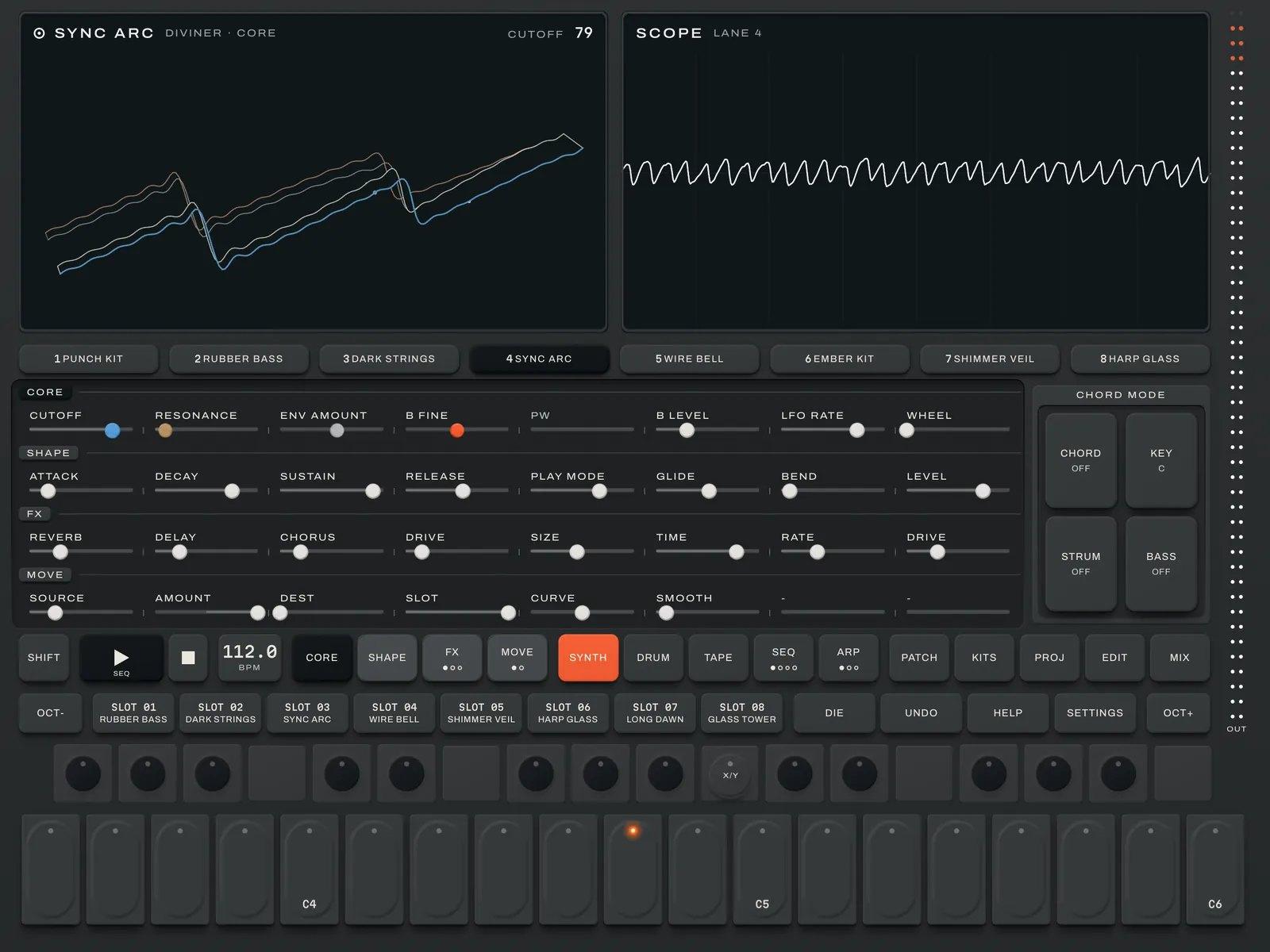
 The iPad synth page: the Diviner analog poly engine, with all eight sliders of a page in view and CHORD MODE beside them. Image: Coast Creative
Four new engines
The 2.3 additions push Tonaut into rougher, odder territory than its virtual analog, FM and wavetable core.
KINK is phase distortion. It bends a wave's phase for tones that run from glassy to buzzy, and it ships with 50 new sounds. Try it for digital keys and basses that need to cut through a busy pattern.
MOUTH is a vocoder that can sing on its own. Played from the keys, it sings its own vowels with no microphone involved, a natural fit for pads and robotic leads. Its Mic sounds sing your voice through the microphone instead: put on headphones, sing and play chords. MOUTH also gets 50 sounds.
CHIP is a lo-fi digital oscillator with stepped waves and fast chip chords. There are 48 sounds for it. Paired with the arpeggiator and the chord pad, it's an obvious route to video-game leads and bubbling 8-bit hooks.
GRIT is a rough, crunchy new drum engine. Each pad is its own drum: a pitched body with a punch, a noise layer and a click, run through its own crusher. BITS, RATE and DRIVE sit under SHIFT. Set a pad to CHIP and it plays a square wave and an old sound chip's noise, for 8-bit drums. It comes with 12 kits.
That makes 12 synth engines. The others are Slope (virtual analog), Cross (six-operator FM, which loads DX7-style SysEx banks), Scan (wavetable), Pulse (twin pulse with PWM), Gut (a modeled string), Swarm (seven oscillators), Dust (grains and noise), Diviner (analog poly) and a Sampler. Every engine has a 3D screen that moves as you play, or a classic view if you'd rather not look at it.
Drums: 55 kits on four engines
Grit joins Knock, where every pad is its own synthesized drum, and Cinder, which puts two layers on each pad and rings the whole kit through one shared resonator. The fourth engine is Slicer, which cuts a recording across the pads. In total there are 12 sampled kits, 31 synthesized kits and 12 Grit kits, with 24 pads to a kit. Choke groups let a closed hat cut an open one, and Pad LINK lets a kick bring its clap with it.
 The drum page on iPhone, with 24 pads and a 3D drum display. Image: Coast Creative
On a kit lane, the arpeggiator becomes a groove player. Hold any pad and the whole kit plays one of 16 grooves, from a plain beat up to fills. On the iPad, a drum lane can swap its keys for 16 big pads, with LIVE for playing and PROGRAM for tapping in one part's steps.
Sampling, now up to two minutes
Sampling in 2.3 takes a single press. On a Sampler lane or a kit lane, REC opens the recorder ready to sample onto that lane. Hold a key and the capture starts when the sound does. You can sample from the microphone, a USB interface or Tonaut's own output. CHOP slices a loop into 8, 16 or 24 pieces, or cuts at each drum hit with HITS. The 2.3.1 update raises the maximum sample length to 120 seconds, though devices with 2GB of memory or less stay at 20.
Sequencer, Song Mode and tape
There are eight lanes, each with 16 patterns of up to 128 steps, or eight bars. Steps take chords, slides, ratchets, a CHANCE value and EVERY conditions, so a loop doesn't have to repeat exactly. Song Mode chains 16 scenes, each holding a pattern and a mute state for every lane, into a song of up to 64 steps with up to 16 repeats each.
 Song Mode on iPad: sixteen scenes, with scene 03 queued to come in next. Image: Coast Creative
Then there's the tape: eight tracks of 20 minutes, or six of 30. You can loop, reverse, stutter and brake it, and CATCH grabs the last 30 seconds you played even if you weren't recording. In 2.3, takes can start with the sound. Set Rec start to SOUND, choose a threshold between -60 and 0dB, and an armed take waits until you play, then keeps everything from just before the first hit.
 The TAPE page on iPad. Image: Coast Creative
The mixer also gains a live spectrum behind every EQ curve, on each lane and on the master.
AUv3 in both directions
Tonaut runs as an AUv3 plug-in ("Coast Creative: Tonaut") in AUM, Loopy Pro, GarageBand, Logic Pro for iPad, Cubasis and other hosts. In a big window you get the full panel. In a small one you get a compact card with all eight lanes, the tape, a keyboard and the host's tempo. You can load several copies, each a complete instrument with its own project. A second plug-in, Tonaut FX, records another app's audio onto Tonaut's tape, and projects move freely between plug-in and app.
 Three copies of Tonaut as plug-in cards in a host at 112 BPM, the second recording to its tape. Image: Coast Creative
Since 2.2, the standalone app works the other way round too. Any AUv3 instrument can sit on a lane, AUv3 drum machines can play a kit lane's pads, and AUv3 effects can go in the FX slots or on the master. Tonaut's sequencer, arpeggiator, chord pad and Song Mode all drive them, and each project saves its plug-ins and their settings. The 2.3.1 update fixes hosting: plug-in windows stay in their frame, and drum plug-ins now play the groove player. Hosting is an app feature; inside another host, load your plug-ins there. For a different take on the one-panel idea, built around phrase sampling and with AUv3 effects in its mixer, see our piece on VU303.
Sync, MIDI and chords
MIDI clock in arrives with 2.3. Set SYNC to MIDI CLOCK and Tonaut follows the tempo and bars of a clock coming in over USB or Bluetooth, smoothed so a Bluetooth link doesn't wobble. With Transport in on, your drum machine's Start starts Tonaut on its first beat. That joins Ableton Link, MIDI out with clock, and MIDI learn. As a plug-in, Tonaut's MIDI in can now be set to LANE, so an MPE keyboard that sends each note on a new channel plays the lane on screen.
 The chord pad on iPad, in the black-and-silver TN-XY look. Image: Coast Creative
The chord pad deserves a mention for anyone who doesn't play keys. Seven keys play the chords of your chosen key and scale, and a stick turns each one into a 7th, 9th, sus, dim and more as you play. Chords go into the arpeggiator, the sequencer and MIDI out. New projects can now start blank, with the default eight sounds, or from a template of your own.
Who it suits
Tonaut makes most sense for people who want to finish ideas in one place: sketch a beat on the train, build it into scenes, print it to tape and export WAV stems, without juggling apps. Loopy Pro and AUM users get a self-contained groovebox they can stack several times over. Producers who already own a shelf of AUv3 synths can use Tonaut as the sequencer and tape deck that ties them together. If you'd rather write in a tracker grid with a piano roll beside it, our look at Tracker Pro 1.2 covers another all-in-one approach on iPad and iPhone.
Tonaut needs iOS or iPadOS 17 or later. It runs on the iPhone XS, XR or newer, but not the iPhone SE, whose screen is too small. On iPad you need a 6th-generation iPad, iPad mini 5, iPad Air 3, iPad Pro from 2017 or newer. It's a single $19.99 purchase on the App Store that covers iPhone, iPad and iPhone Duo, each with its own layout. There's no subscription and no account, and Tonaut collects no data. It's on the App Store, and manuals and guides are at tonaut.app.