Cinescapes Pro Brings Rast Sound's Generative Ambient Instrument to iPad and iPhone as an AUv3

Some instruments want you to build a sound from an oscillator up. Cinescapes Pro starts at the other end. You choose a feeling, a scale and a key, press Generate, and a chord progression unfolds across layers of pad, bass, noise and atmosphere. From there you shape it: swap sounds, lock the layers you like, draw how they rise and fall, and decide whether the harmony loops or keeps changing. It's an instrument for building an ambient bed around generated harmony and layered sounds.
Cinescapes Pro comes from Rast Sound, with Rast Media GmbH as the App Store seller. It started out as a desktop plug-in for cinematic and generative ambient music. Announced this week, the new iPhone and iPad version runs as a standalone app and as an AUv3 instrument, with a landscape layout for iPad and a portrait layout for iPhone. It needs iOS or iPadOS 15 or later. Full details are on the Rast Sound product page.
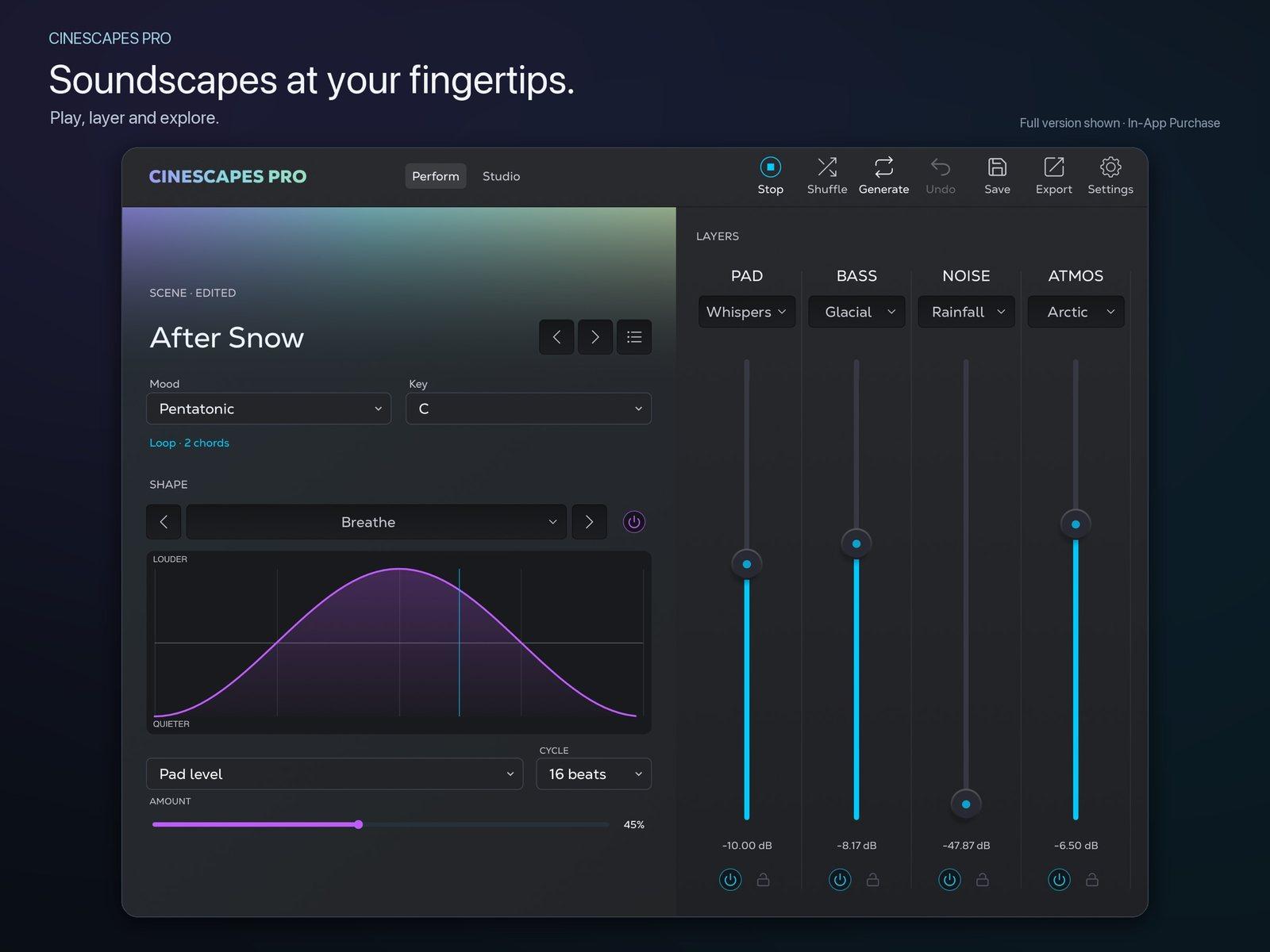
 The iPad Perform workspace: scene After Snow in C Pentatonic, Loop mode, the Breathe shape on Pad level, and faders for the Whispers, Glacial, Rainfall and Arctic layers. Image: Rast Sound
Layers and a progression
Every scene is built from the main layers Pad, Bass, Noise and Atmos. The full factory bank contains 160 main-layer sounds in total. In the After Snow scene above, that's a Pad called Whispers, a Bass called Glacial, a Noise layer called Rainfall and an Atmos layer called Arctic, each with its own fader in the Perform view.
The harmony comes from the Mood tab. Moods include Joy, Dark, Mystic, Deep, Calm, Sad, Tense and Sweet. Scales include Major, Minor, Harmonic, Pentatonic, Blues, Mixolydian, Lydian and Dorian. Pick a mood, scale and key, and Cinescapes generates a chord progression. Then you decide how it behaves over time. Loop repeats the progression, which is what you want under dialogue or a cue that has to sit still. Evolve lets new chords emerge, an option for long-form listening or an installation where you want the harmony to change.
 The Mood tab in the Studio workspace: moods and scales to steer the generated harmony. Image: Rast Sound
The toolbar keeps the main moves in reach: Play/Stop, Shuffle, Generate, Undo, Save, Export and Settings. Shuffle swaps the sounds, and you can lock any layer you want to keep. Try this as a starting point: Find a pad you love, lock it, and shuffle the bass, noise and atmosphere around it until the whole scene works.
Shapes, filters and space
Ambient music lives or dies on movement, and Cinescapes handles it with Shapes. There are 16 built-in curves, or you can draw your own to control how a layer's level moves. In the Perform screenshot, a curve called Breathe targets Pad level, with cycle and amount controls. Try a slow swell on the pad and a shorter curve on the noise layer to give them different level movements.
 The Shape tab: pick one of 16 movement curves or draw your own. Image: Rast Sound
The Studio workspace goes deeper. Each layer has Filter, Delay and further sound controls. Along the bottom sit scene-wide controls for Variation, Complexity, Duration, Mix Type, Drive, Bright, Smooth, Speed, Depth and Shimmer, along with Mod controls. The space around it all comes from a Shimmer effect and a convolution reverb.
None of this is a synth editor in the traditional sense, and it isn't meant to be. If you want to design a wavetable from scratch or patch a modular voice, look elsewhere. Cinescapes centers on arranging and steering its included sounds.
Standalone or in a host
Standalone and AUv3 operation serve different parts of the workflow.
As an AUv3 in hosts such as AUM, Loopy Pro or Cubasis, it has an Engine switch. With Engine On, Cinescapes follows the host's transport and tempo when the host provides them, so a generated progression starts and stops with your project. With Engine Off, you play it yourself from MIDI or a keyboard. That's the mode for layering it under other instruments: a Cinescapes pad played from your controller underneath a piano part, for example, or bedded below a lead synth in a loop-based set. If you want to turn an existing track into a pad as well, Parallel Minds' Atavism makes a good partner on the effects side.
The standalone app is where you capture and export. It handles WAV recording and offline rendering, and it can export MIDI. It also supports background playback and lock-screen controls, so you can leave a scene running while you use another app.
Ways to use it
- Score a short film cue. Pick Tense or Dark, choose a minor or harmonic scale, set Loop, and render a WAV in the standalone app. Use the per-layer faders to bring the noise layer up as the scene builds.
- Make a bed for a podcast or game. Choose Calm or Deep with a Pentatonic scale, set Loop, and keep the Shapes gentle to leave room for the voice or the gameplay.
- Sketch on the phone, finish in the DAW. Generate progressions on the iPhone during your commute, save the scenes you like, then export the MIDI and reharmonize or orchestrate the chords with your own instruments.
- Run it under a live set. Load the AUv3 with Engine On and let Evolve keep the harmony moving underneath loops or improvisation. Use the layer controls to balance it against the rest of your set.
Try it free, unlock once
Cinescapes Pro is a free download, and the free version includes three complete scenes, Deep Joy, Glass Orchard and Interstellar, along with their sounds. That's enough to learn the workflow and hear whether it suits your music.
 The Scenes browser in the Studio workspace. The full unlock includes all 34 factory scenes. Image: Rast Sound
A single in-app purchase, Cinescapes Pro Full Unlock, costs $29.99. It unlocks all 34 factory scenes, all 160 main-layer sounds, scene saving, WAV recording and offline rendering, and MIDI export. There's no subscription. The iPhone and iPad app is a separate purchase from desktop Cinescapes PRO.
The factory sound bank is built in, and sound generation runs on the device. There's no account to create, no cloud service, and the app collects no data.
Who it's for
Cinescapes Pro suits film and game composers, podcasters, content creators and songwriters who build atmospheric beds, and ambient players who'd rather steer a scene than build one oscillator at a time. The mood-and-scale approach provides the harmonic starting point; Studio controls and Shapes let you adjust the layers and their movement. MIDI export means the chords don't stay locked inside the app.
If you'd rather build textures from raw synthesis or procedural engines, an app such as HollowTone gives you more to dig into. For scene-based cinematic writing, the free version of Cinescapes Pro offers a place to start.