INERTIA Machine: A Spinning Flywheel Synth and AUv3 Effect for iPad and iPhone

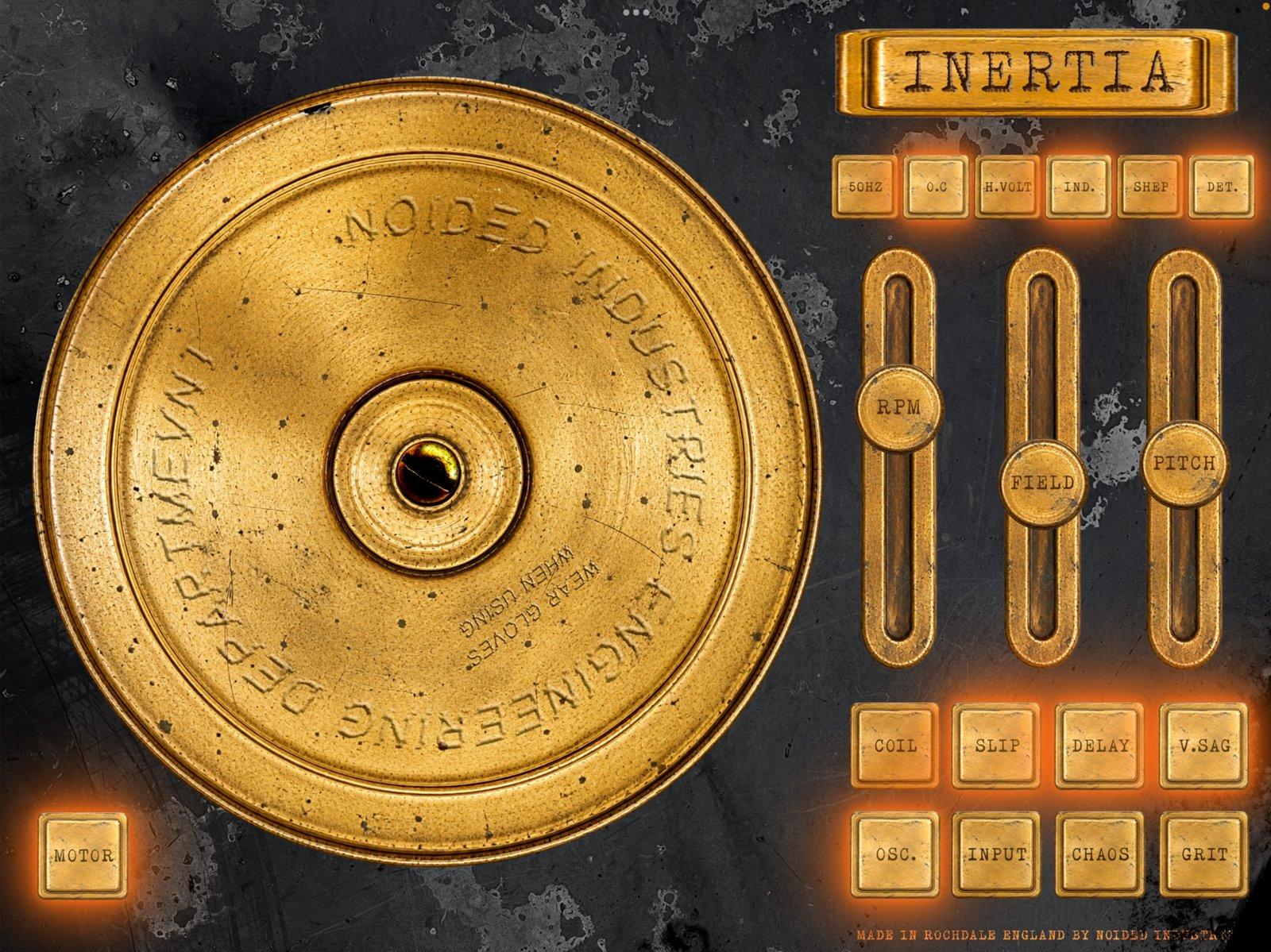
INERTIA Machine asks you to throw something heavy. At its centre is a brass flywheel wired into a failing power supply. Give it a spin and it hums. The faster it turns, the harder it screams. Let go and it coasts down under its own weight, the pitch sinking as it slows.
It comes from NOIDED Industries, the Rochdale imprint of developer Anthony Moran, and it arrived on October 30 as a standalone app, an AUv3 instrument and an AUv3 effect for iPhone and iPad.
 The whole instrument on one page: the disk, six modes, three sliders and eight switches. Image: NOIDED Industries
Physics as the performance
The disk is the instrument. Speed sets how hard it drives, and the flywheel physics give it real weight, so a throw keeps turning after your finger has left the glass. Rest a finger on it and it brakes. Drag it backwards and the whole machine drops an octave and goes dark, with the sound turning around the stereo field as the disk rotates.
That last trick is the one to learn first. A forward throw followed by a slow reverse drag gives you a rise, a fall and a change of colour in one gesture, all from one hand.
There are three ways to drive it:
- By hand. Throw it, brake it and reverse it directly.
- By motor. Switch on MOTOR and set the RPM slider, and the disk turns on its own. Pull the RPM down for a slow drone that keeps running while your hands do something else.
- By MIDI. Play it from a keyboard and the notes drive the disk.
On iPhone, haptic knocks push back under your finger, harder as the disk speeds up. SHAKE goes further: move the device while the disk spins and the sound wobbles, bends and rattles in real time. SHAKE can be switched off in settings.
 Hand or motor: the MOTOR switch sits in the bottom-left corner. Image: NOIDED Industries
Six modes, stacked
Across the top of the panel run six mode buttons, and they stack in any combination:
- 50HZ, a mains hum.
- O.C, overclock.
- HI.V, high voltage.
- IND, industrial.
- SHEP, an endless rising Shepard tone that falls instead when you spin the disk the other way.
- DET, a drifting detune.
SHEP is the one to explore. Because it follows the direction of the disk, the illusion of endless ascent becomes something you steer by hand.
Try it: start with 50HZ alone and the motor at a low RPM, then add DET for drift. Bring in SHEP and drag the disk backwards to turn the climb into a fall.
The rest of the panel
Below the modes sit three sliders: RPM for the motor, plus FIELD and PITCH. Eight square switches fill the bottom of the panel. COIL, SLIP, DELAY and V.SAG (voltage sag) shape the character of the machine, and GRIT takes it to the dirty end. CHAOS throws every setting in the air and lets it land, a quick way out of a patch that has gone stale.
The panel is designed for iPad. It runs on iPhone, but the labels are hard to read on a phone screen.
Feed it your own sound
INERTIA is not only a sound source. OSC runs the internal generator, while INPUT runs the microphone, or your host's audio when it is loaded as an effect, through the disk. Run both at once to blend the machine's own voice with whatever you feed it.
In a host it appears as two plug-ins, NOIDED INDUSTRIES: INERTIA and NOIDED INDUSTRIES: INERTIA FX. Put the FX version on a piano, a vocal or a drum bus, and the speed of the disk becomes a performance control over your own material.
In your host
INERTIA works in AUM, Loopy Pro, Logic Pro for iPad and other AUv3 hosts. Every control sits on a fixed MIDI CC, from 13 to 31, and the mod wheel spins the disk. Host automation covers the full panel, and hand spins record straight into Logic as automation. When the host transport stops, the disk lets go.
It ships with eight factory machines, an INIT patch and room for unlimited presets of your own. The manual is built in: tap the nameplate.
 INERTIA FX in AUM, beside its siblings Tetsuo, Pneumatic and Wail. Image: NOIDED Industries
Part of a set
INERTIA is one of six NOIDED Industries units: Engaged, a telephone-exchange synth sequenced by Morse code; Corrode, a rusty tank reverb; Pneumatic, a valve pressure synth; Tetsuo, a drum and noise machine; and Wail, a feedback synth. Tetsuo, Pneumatic and Wail share INERTIA's scuffed industrial look, and they run side by side in a single AUM session.
If the idea of an instrument that behaves like a physical system appeals, Terrarium Machine takes the same approach with weather instead of machinery, and Photophore 2 builds its sound from a moving flock of voices.
Price and availability
INERTIA Machine costs $3.99 on the US App Store, and one purchase covers iPhone and iPad. It needs iOS or iPadOS 15.6 or later, and the developer collects no data from the app. The rest of the range is at NOIDED Industries.
INERTIA Machine suits anyone making drones, industrial textures or film sound who would rather play a sound with their hands than program it.