Terrarium Machine Puts a Living, Always-in-Key World on iPad and iPhone

Somewhere behind the hills, a train is coming. The wind is picking up, a few crickets have started, and a brook runs along the bottom of the screen. Nothing in Terrarium Machine is recorded and nothing loops. The whole scene is simulated, in order, from a seed, and every drop of rain lands on a note in your chosen key.
Terrarium Machine is the iPhone and iPad edition of Terrarium by TouchMachines, the studio of Karl White. It's a small world that never stops sounding. You don't program it so much as lean over it and poke things. It runs full-screen as a standalone instrument or as an AUv3 inside your host.
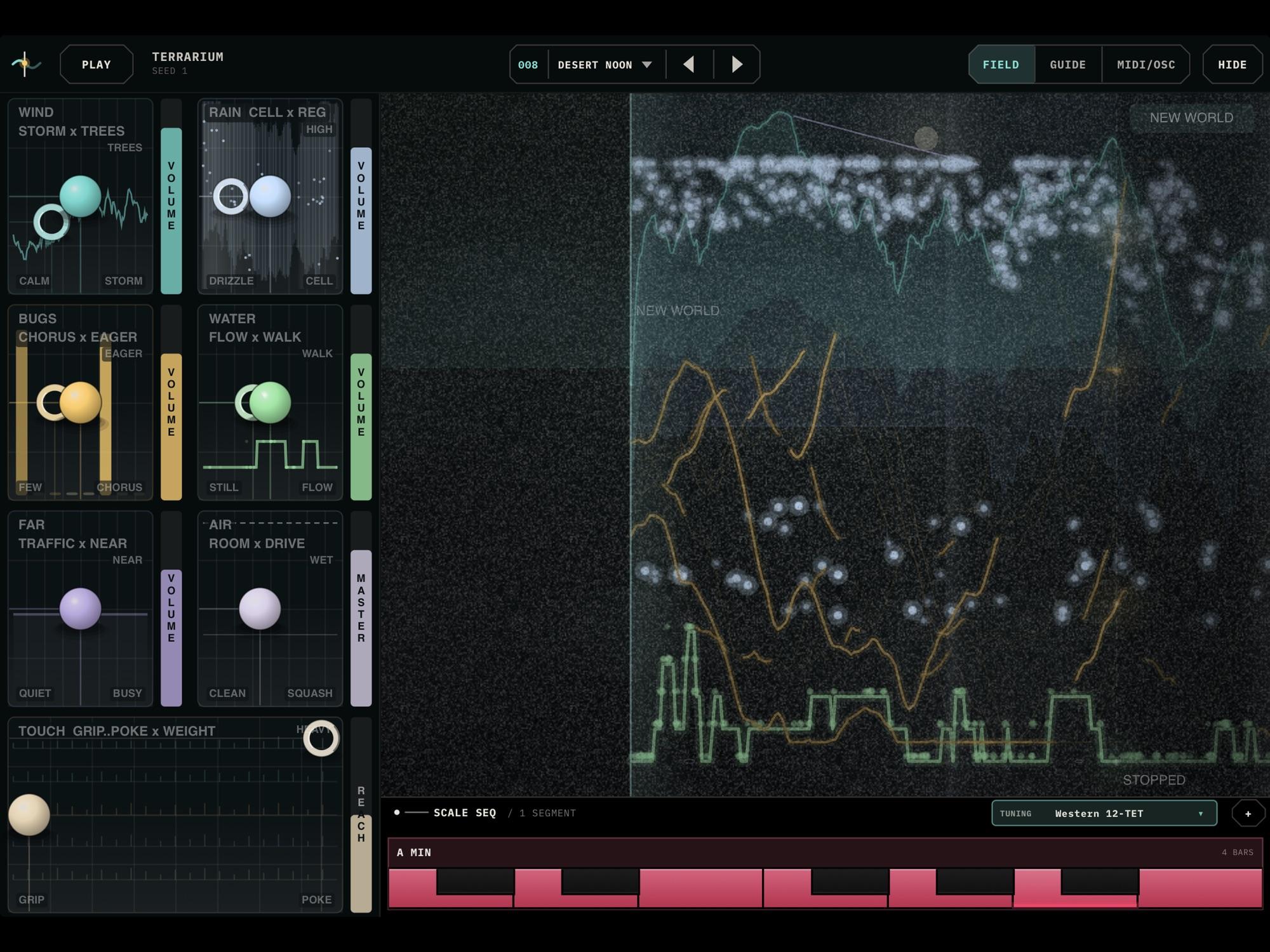
 Desert Noon on iPad, with the rail on the left, the field on the right and the key along the bottom. Image: TouchMachines
Five layers of weather
The world is built from five living layers: wind with its own thunder, rain, insects, running water and a distant road. Each one is a voice in a generative piece, and each one keeps to the key set along the bottom of the screen. Rain uses the whole scale, so over time every note in the key comes up. The bugs sing when they feel like it. Trains are rare and take their time.
Terrarium Machine also offers a starting point other than an empty field. Ten worlds ship with it, from Cricket Hour to Squall Line, and NEW WORLD rolls a fresh seed: new weather from the same ingredients. If you liked the last one, save it as a preset before you roll.
The picture is time
The big field on the right is a timeline. The bright vertical line is now. Everything to its left has already happened, and the right edge shows the next few seconds. The world is drawn ahead of the sound, so you see a raindrop before you hear it land. Rain falls from the top, the wind is the ribbon across the middle, the bugs are the small bright points, water runs along the bottom and the road is the orange lines at the far right.
Because the future is already on screen, you can touch what hasn't happened yet. That turns a generative ambient app into something you actually play.
Grip: hold the tape
With the TOUCH control set to GRIP, a finger on a stream holds the tape. Drag it backwards, slow it down, scrub it forwards. Let go fast and it keeps rolling. Let go slowly and it snaps back to now.
The wind behaves differently. Catch it and the storm holds where you caught it: push up for a gust, pull down for a lull. Fling the wind into the future and a front comes back for you. One finger on empty sky drags the day itself, so pulling toward evening wakes the bugs. Two fingers on the sky hold the whole world's breath.
Try it: load Cricket Hour, press PLAY, then drag the day back and forth across dusk. The insects come and go with the light.
Poke: provoke the world
Slide TOUCH toward POKE and your finger provokes the world rather than holding it. Tap the rain and a drop falls there. Bow through the wind and it gusts. Double-tap the rain for thunder, or the road for a train. Settings between the two ends give you some of both. The WEIGHT axis on the same pad sets how heavy things feel: light snaps back, heavy keeps rolling.
Try it: in Squall Line, set TOUCH to GRIP, catch the wind just as it peaks and hold it. Pull down and wait for the thunder to come closer.
Shaping each layer on the rail
Down the left side, each layer gets its own box, drawn live, with a bead you drag in two dimensions and a volume fader beside it. WIND runs from calm to storm, and pushing up puts trees in the field for the gusts to rustle. RAIN goes from drizzle to downpour, and up moves the drops higher. BUGS moves from a few insects to a full chorus, with up making them keener to start. WATER goes from a still pond to a running brook, and up makes it wander between its notes. FAR is the road: right is busier, up is closer.
AIR is where everything leaves. Push up to put the world in a room, and push right to squash it, gently at first and then not gently at all. Some boxes also carry a hollow ring, a second pair of settings for the same layer, such as a lower voice under the raindrops.
The result is a mixer where the beads shape the weather and the faders set each layer's level. Pull back BUGS and FAR for a sparse, rain-led bed, or push WIND toward STORM and let the thunder arrive on its own schedule.
 The scrolling field in the desktop version of Terrarium, running Desert Noon. Image: TouchMachines
Always in key
The strip along the bottom sets the key the whole world plays in. You can change it, or tap + to chain keys into a progression. Because the future is written in the key it will play in, key changes land on the bar and in tune.
There are 16 scales and 11 tuning systems, maqam and just intonation among them. Swap the tuning and every drop and every bug retunes to the new grid.
Try it: set up a two-segment progression, such as A minor moving to F major, and let a soft rain preset run across it, so the drops follow the harmony as it moves.
Let the weather play your synths
As an AUv3, Terrarium Machine loads in GarageBand, AUM, Logic Pro, Cubasis, Loopy Pro and other Audio Unit hosts. Every layer can send its own MIDI notes, so the weather can play your other instruments, and the MIDI/OSC view sets up what goes out. Route the bugs to a soft pad and the rain to a pluck, and the world writes the melody while your instruments supply the tone.
That makes it useful beyond ambient beds. Send the water to a bass patch for a wandering low line, or the road to a drum rack for sparse, unpredictable hits. HIDE removes the rail and the scale strip and leaves you just the field, which is the layout for playing it live. Six colour themes recolour the whole world, sky and weather included.
For more generative instruments on iPad, HollowTone builds sample-free ambient layers shaped by macro faders, and Cinescapes Pro generates cinematic ambient progressions. Terrarium Machine is built around touch: a world you grab, drag and provoke while it plays.
Price and availability
Terrarium Machine costs $9.99 on the App Store, with no in-app purchases, no account, no ads and no data collected. It runs on iPhone and iPad with iOS or iPadOS 15.0 or later. Version 1.0.16 fixes the Settings and theme picker freezing when Terrarium runs as an AU in hosts such as GarageBand. TouchMachines also sells Terrarium for Windows and macOS as a VST3, AU and standalone instrument, as a separate purchase. Visit TouchMachines for more.
It suits ambient and soundtrack musicians who want an evolving bed that stays in key, and producers who want a generative source of MIDI melodies they can steer with their hands.