FieldSynth: The Tin Box's Generative Particle Synth Lands on iPad and iPhone as an AUv3

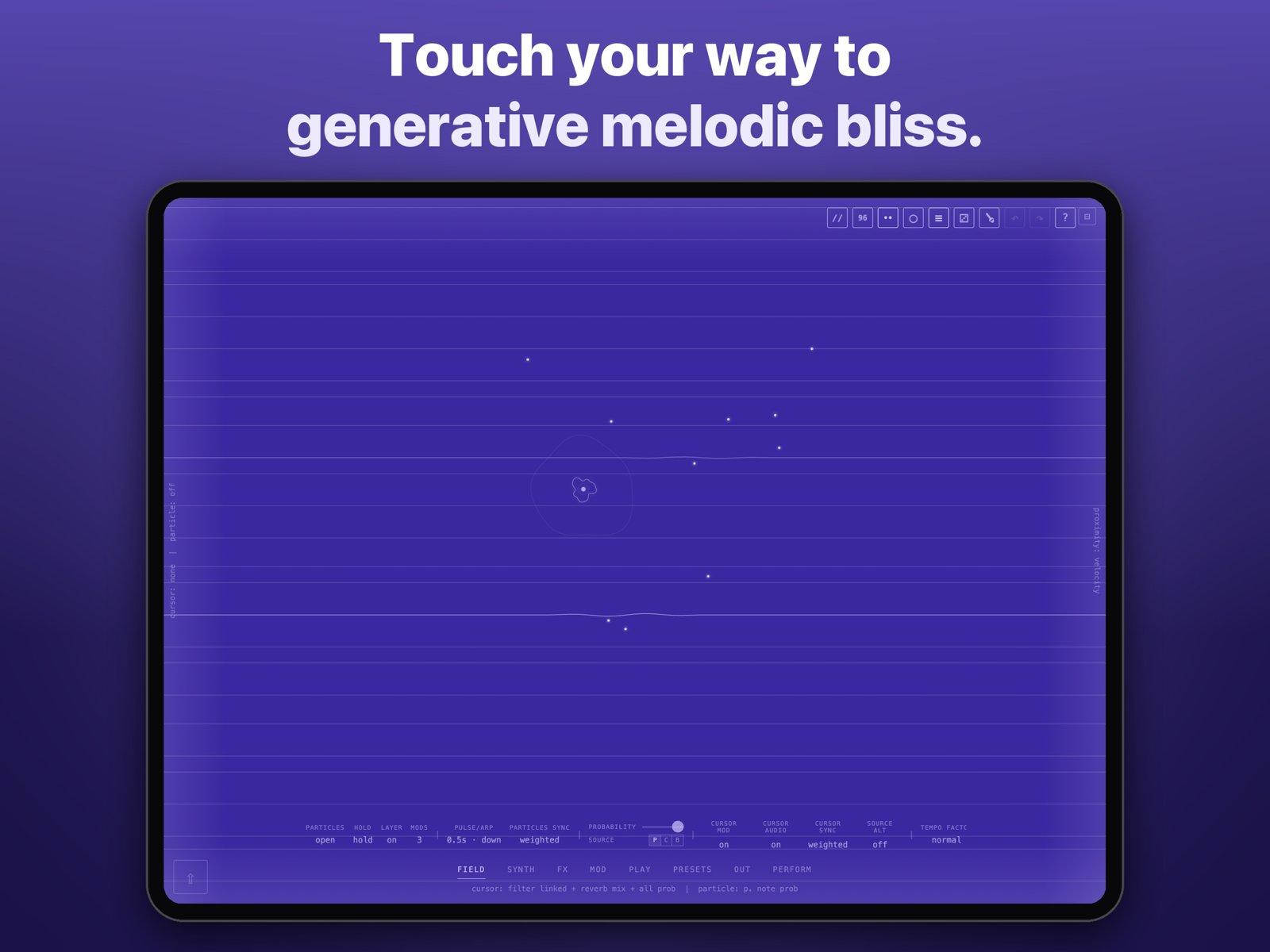
Most generative apps ask you to set up the rules and then step back. FieldSynth wants your finger in the middle of it. The screen is a field of slowly drifting particles crossed by horizontal pitch lines, and a cursor sits under your fingertip. Drag it through the swarm, hold it still, or switch on Wander and let it roam by itself, and the motion turns into melodies, arpeggios and rhythms, always in key.
It is the work of Tucker Sferro, who releases melodic electronic music as The Tin Box. FieldSynth started life as a VST3 and AU plug-in for Mac and Windows, and on November 21 it arrived on the App Store as a universal standalone app and AUv3 instrument for iPhone and iPad. Three days later it was already on version 1.0.7.
 The field itself: particles, pitch lines and the cursor, with the tab bar and field controls along the bottom. Image: The Tin Box
Three voices, one field
FieldSynth plays three voices at once. The particles carry one of them. The cursor carries two more, Cursor A and Cursor B, which can be split or layered, or swapped on triggers, LFO cycles or chance. Pitch is set by where a note happens in the field, mapped onto any of 15 scales in any key, across a note range you can open from C0 to C8. When a note sounds, its pitch line shivers like a plucked string.
Every voice runs on one of two engines. The subtractive engine offers sine, triangle, saw and square oscillators through a low-pass filter with resonance. The FM engine pairs a carrier and modulator per voice, with harmonicity setting their ratio, a modulation index for depth, and a dedicated envelope on the modulator, so tones can move from clean bells to harsh, glassy metal. Each voice also gets a full ADSR and low, mid and high EQ.
You rarely need to start from scratch. FieldSynth ships with 829 factory voices tagged as plucks, keys, bells, pads, basses, drones, strings and IDM/FX, and any of them can be auditioned and dropped onto the particle or cursor slot in a couple of taps.
Rhythm by probability
The clever part is timing. Instead of locking each voice to one subdivision, FieldSynth lets you weight several at once. Give the particles three parts 1/16, two parts 1/8 and a single part 1/32, add a little dotted or triplet feel, and the grid keeps resampling between those divisions as the phrase plays. Each of the three voices can carry its own weights, so the parts drift against each other rather than marching to one pulse.
 Weighted subdivisions in the Particles Sync panel. Each voice can have its own mix of divisions and feels. Image: The Tin Box
Quantization runs from 1/2 down to 1/128, with weighted rhythms and step spread, or you can drop it entirely and let notes flow freely with the motion. Timing can follow the host tempo, your own cursor movement or incoming MIDI notes, each with its own grid.
Around that sit the tools that turn movement into phrases:
- A 15-pattern arpeggiator steps through the live particles, with patterns including up, down, converge, zigzag, stutter and random
- Degree sequences, 18 built-in progressions plus a custom editor, shift the tonal centre on a timer, so a patch keeps changing harmonic ground on its own
- A custom note sequencer replaces the scale with your own ordered list of notes
- Layer mode stamps separate particle groups into the field, radiate bursts particles outward, and loop recording replays your cursor gestures
- Humanize loosens the timing, while Deterministic mode does the opposite: the same cursor move always produces the same notes, with no dropped notes and no timing or velocity humanizing, which is handy for repeatable takes and A/B comparisons between patches
Try it: load a Quantized preset, weight the cursor towards 1/16 with a little 1/32, then set the particles to slower 1/4 and 1/8 divisions. Hold the cursor in one spot and listen to the two layers move at different speeds against each other.
The field modulates itself
Four global LFOs, with sine, triangle, saw, square and three random shapes, run free or synced to tempo and feed a matrix of up to 12 routes. Targets include filters, effects, envelopes, FM depth, timing and note probability.
The field is a modulation source too. Cursor X and Y can each drive up to three parameters, so you might set dragging upward to open a filter and sliding sideways to push more signal into the reverb. Each particle's position does the same, and proximity mods turn the distance between particles and the cursor into a control signal, so the sound tightens as the swarm closes in and opens up as it drifts away. Generation mods shape how new particles are born, from launch motion and spawn stagger to direction spread and octave bias.
The effects are straightforward. A reverb offers two algorithms, a lean four-channel design and a denser eight-channel one, with size and low cut, and a mono or ping-pong delay can be synced to tempo or set freely.
 Mutate and Randomize, with a depth control and a checklist of exactly which parameters are allowed to change. Image: The Tin Box
When you want something new without editing, the randomizer is unusually polite. Set a depth, tick which groups of parameters are allowed to change, and either roll a fresh patch or mutate the current one by a few percent. Undo and redo cover every change, so there is no penalty for exploring.
Wander, Perform and presets
Wander mode moves the cursor by itself at a speed you choose, for a set time, which makes FieldSynth a strong candidate for long ambient beds and installation-style sessions. In standalone mode the screen stays awake so the iPad can be left to play.
 The Play tab, with Wander, radiate and loop recording. Image: The Tin Box
For live use, a custom Perform page collects your favourite controls in one place. There are 24 colour palettes, from near-black to bright white, plus a random colour generator, which matters more than it sounds on a stage or a dim studio desk.
The 71 factory presets are split into two banks: 46 Quantized patches built on tight rhythmic grids and 25 Flow patches that are looser and pulse-based. You can save your own, import and share preset files, and browse the community presets that The Tin Box hosts online.
A MIDI brain for AUM
FieldSynth makes a good sound source in its own right, but it may be just as useful as a MIDI generator. The particles, Cursor A and Cursor B each send on their own MIDI channel, so in AUM one instance can play three other AUv3 instruments at once, say a pad, a pluck and a bass, each following its own voice in the field. You can also record what it plays as a standard MIDI file and take the phrases into a DAW.
Play it from a MIDI keyboard and each held note becomes a cursor at that pitch's height in the field, pulling particles towards it and sounding notes as it goes. That makes it an unusual kind of arpeggiator: hold a chord and every note becomes its own cursor working the swarm.
If you like the idea of an instrument that composes alongside you, FieldSynth sits well next to Terrarium Machine, a living, always-in-key world shaped by weather, and Cinescapes Pro, a generative ambient instrument. For the MIDI routing side, Konstrukt gives you a host to build around it.
The Tin Box's walkthrough
Sferro's own walkthrough runs just over an hour. It is filmed with the desktop plug-in, but the field, controls and generative note logic are one shared interface across every platform, so it doubles as a tour of the iPad version. It ends with FieldSynth driving Omnisphere over MIDI.
Price and availability
FieldSynth costs $9.99 on the US App Store. One purchase covers iPhone and iPad, including both the standalone app and the AUv3 instrument for hosts such as AUM, Cubasis and GarageBand. It needs iOS or iPadOS 17 or later and takes up about 25 MB.
The desktop version for macOS and Windows (VST3, AU and standalone) is a separate purchase from The Tin Box, currently $15 through Gumroad. There is also a free browser version that runs without a download or an account, which is a quick way to get a feel for the field before you buy.